
GST-correct
Place of supply decides CGST + SGST or IGST. Without a GSTIN, documents print as a Bill of Supply.
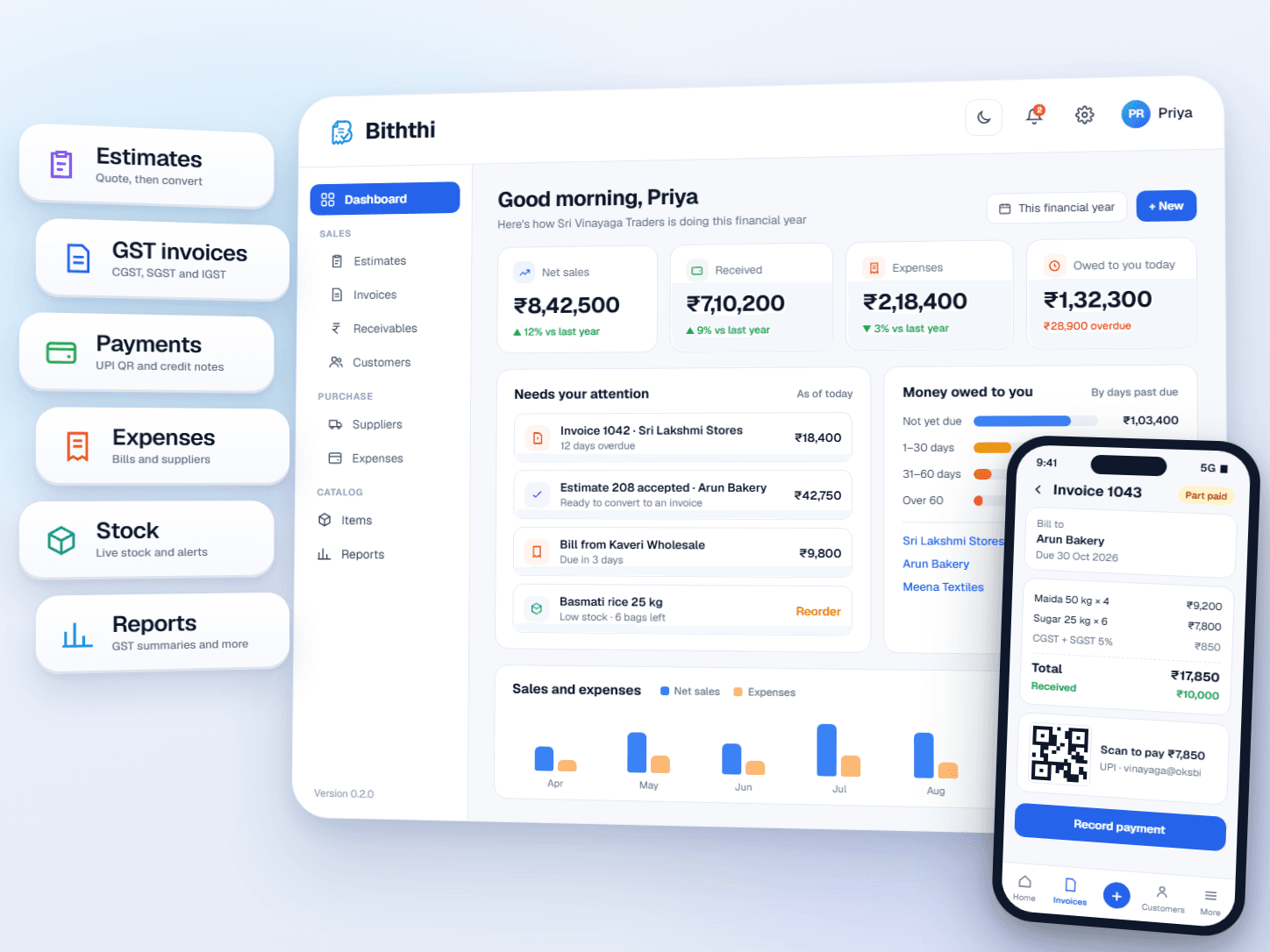
Biththi brings estimates, GST invoices, payments, credit notes, purchases, stock and analytics into one workspace, built for Indian retail, service and jewellery businesses.
Send an estimate, turn it into a tax invoice, record full or part payments, and see who owes what at a glance.
Quote
Estimates
Bill
Tax invoices
Collect
Payments
Place of supply decides CGST + SGST or IGST. Without a GSTIN, documents print as a Bill of Supply.
Estimates become invoices, invoices take payments and credit notes, and every step lands on the customer statement.
Printed invoices carry a UPI QR for the balance due, and Receivables shows who is overdue and by how long.
Standard retail and services billing out of the box, with jewellery pricing for weights, metal rates and making charges.
Biththi started as an invoicing app and now covers the whole billing cycle: quotes, tax invoices, collections, returns, supplier bills and stock. Everything stays linked, so the numbers on your dashboard match the documents behind them.
Validate customer GSTINs, including state code and check character, and fill in PAN and state automatically.
Record full or part payments by cash, UPI, bank transfer, cheque or card, and settle several invoices at once.
Print A4 tax invoices with your logo, HSN summary, amount in words, bank details and signature.
Each document carries forward into the next, so you never type the same customer, item or amount twice.
Pick a customer and items from your catalog. Track each estimate as draft, sent, accepted or declined.
Convert an accepted estimate in one step. GST, round-off and the due date from payment terms are filled in for you.
Log full or part payments and issue credit notes for returns. Returned goods can go straight back into stock.
Check overdue aging in Receivables, share customer statements as PDF, and follow trends and download reports in Reports.
Sales, purchases, stock, collections and reporting share the same customers, items and numbers, so nothing has to be copied between tools.
Create quotes with the same line items as invoices, track draft, sent, accepted and declined, and convert accepted estimates into draft invoices.
Tax Invoice or Bill of Supply, place of supply, IGST or CGST + SGST, HSN/SAC summary, round-off and the amount in words in Indian numbering.
See the total owed, what is overdue and payments this month. Aging buckets split it by 1–30, 31–60, 61–90 and over 90 days, by customer or by invoice.
Record full or part payments across one or many invoices. Issue credit notes for returns or price corrections, with returned goods added back to stock.
A statement of account with opening balance, every invoice, payment and credit note, a running balance and open invoices. Pick a financial year or custom dates and save as PDF.
Keep supplier records with GST and payment terms, log expenses and purchase bills, and choose GST-inclusive or exclusive amounts.
Purchase bills add stock and saved invoices take it out. Set reorder levels, filter low stock, and stop invoices that would sell what you do not have.
Gross, stone and net weight, purity, HUID and hallmark details, wastage and making charges, with daily gold and silver rates shown in the app header.
Sales, collections, customers, items, expenses and GST compared with the period before, plus GSTR-1, HSN, aging, stock and profit reports to download as CSV or PDF.
A4 print, PDF and PNG export, copy to clipboard, your logo and signature, bank details, and a UPI QR code for the amount still due.
Invite your team with admin and user roles, keep favorites, and review a full audit history of changes on the Growth plan.
A public user guide for every module and an interactive OpenAPI v1 reference, with token sign-in for mobile apps.
Biththi puts guardrails where billing mistakes usually happen, so your invoice series, balances and tax figures stay consistent as your business grows.
Invoice numbers are given only when an invoice is saved, so deleting a draft never leaves a gap in the series.
Balances, amounts received and payment status are kept up to date by the server from recorded payments and credit notes.
An invoice with payments or credit notes cannot be deleted, moved back to draft, or edited below what was already collected.
Saved invoices keep their tax treatment, so later edits such as recording a payment never re-tax an old invoice.
Your business state comes from your GSTIN and the customer's from their address, so every invoice gets the right tax type without manual checks.
Free to start
The Starter plan includes unlimited drafts, estimates, customers and items, and up to 25 saved invoices. No card details, no trial expiry.
What businesses usually ask before moving their billing to Biththi. Want more detail? Read the user guide.
Yes. Each invoice records its place of supply. Sales within your state get CGST + SGST and sales to another state get IGST at the combined rate. If your business has no GSTIN, documents print as a Bill of Supply with no GST. Printed invoices include the buyer's GSTIN, an HSN/SAC tax summary, round-off and the amount in words.
Yes. Record a payment by cash, UPI, bank transfer, cheque or card against one invoice or several invoices of the same customer. A smaller amount records a part payment and the invoice shows the balance due. Sales > Receivables shows the total owed, what is overdue, and aging by customer or by invoice.
Issue a credit note against a saved invoice for a sales return, price correction or other reason. Choose the quantity and value to credit on each line and GST is added at the line's rate. Returned products can be put back in stock automatically, and the credit note prints as an A4 document that refers to the original invoice.
Add your UPI ID in Settings and unpaid invoices print with a UPI QR code for the balance still due. Once the money arrives, record the payment in Biththi and the invoice updates to Paid or Part paid.
Yes. Keep supplier records, log expenses and purchase bills, and link bill rows to your items to add stock. Saved invoices reduce stock, reorder levels flag low items, and an invoice that would take stock below zero is stopped.
Yes. Choose the Jewellery organization type to price by gross, stone and net weight, metal rate, wastage and making charges. Items can store metal, purity, hallmark number, HUID and tag details, and daily gold and silver rates set in Settings appear in the app header.
The Starter plan is free with no card details and no trial expiry. It includes unlimited drafts, estimates, customers, suppliers, expenses and items, PDF and PNG export, basic reports, and up to 25 saved invoices. Growth adds unlimited saved invoices, cloning, advanced reports, bill photos on expenses, audit history, watermark removal and priority email support.
Yes. The user guide covers every module, roles, settings and plans. Open it from Docs at the top of any page, or from Help & docs inside the app.
Add your business details, a customer and an item, and Biththi handles the tax, numbering and print layout. Start on the free plan and upgrade when you need to.